A rank tracker API takes a keyword and a location, loads the Google results page through its own proxies and returns the organic results as JSON. Your script finds your domain in that list and stores its position next to yesterday’s. I sent the same 20 keywords to seven of these APIs, US-wide and with the city set to Austin, Texas, then compared what came back with two Chrome windows opened in the same minute.
- SerpApi, HasData and Bright Data applied the city. Every organic result they returned for “dentist”, “pizza near me” and “home depot hours” in Austin named Austin, while Serper and ScraperAPI returned results for other towns, such as Frederick, Maryland, and Beardstown, Illinois.
- Two APIs rarely agree on a position. The closest pair gave the same position to about three sites in four, and two Chrome windows, one signed in to Google and one not, agreed on fewer than one in five.
- On mobile the top 10 changes. Depending on the API, it kept between about two fifths and three quarters of the desktop sites.
- Google sometimes answers with a second version of the results page, on topic but with a different set of sites. Every API got it now and then, and so did both Chrome windows.
HasData is our own product. Its Google Rank Checker API answered all 20 US-wide searches with a median of 2.2 seconds, and none took longer than 3.0. In Austin, every organic result it returned for the local keywords named Austin. A check costs 5 credits, so the $59 Startup plan covers 1,000 keywords a day on desktop with 150,000 of its 200,000 monthly credits and leaves the rest for rechecks.
What a rank tracker API returns
A rank tracker API is a SERP API used for one job. You send a keyword with a location and often a device, the service loads the results page through its own proxies and parses it, and every organic result comes back with its position, title, destination URL and the URL as Google displays it. Vendors sell this same call as a rank tracker API, a rank tracking API, an SEO ranking API or a rank checker API.
The video replays one real call for “pizza near me” with the city set to Austin. The response arrived in 2.8 seconds, and tripadvisor.com came back fifth, one place lower than in the same call a week earlier.
Google’s own APIs cover only part of this job. The Search Console API returns the average position of a site you own, grouped by query, page, country or device, and it can’t show where competitors rank. The Custom Search JSON API is closed to new customers, and existing customers have until the start of 2027 to move to something else. Positions for arbitrary keywords and arbitrary sites come from a third party.
A rank tracking platform runs the same checks on its own schedule, keeps the history and charges per tracked keyword. Every platform in this list also gives API access to what it collects, on terms that range from an endpoint on every plan to an add-on sold only with the top tier. With a raw SERP API you own the storage and the reporting. With a platform API you read what the platform already stored, at the platform’s update frequency. The same split applies to SEO APIs in general, where keyword and backlink data come either as a raw feed or as an export from a platform.
How I tested
Each of the seven APIs got the same 20 keywords, sent one at a time. Ten are about SEO and SERP tools, three are local (“pizza near me”, “dentist”, “home depot hours”), and the rest are everyday searches such as “tesla stock” and “how to tie a tie”.
I ran the set US-wide on desktop (gl=us, hl=en), then with the city set to Austin, Texas, then US-wide on mobile. Serper and ScraperAPI’s Google endpoint don’t have a mobile option, so the mobile pass covers the other five.
As a reference, two Chrome windows loaded the US-wide pages within the same minute, one signed in to Google and one with a fresh profile. Positions count organic results only, so ads and the map pack don’t get a position. Response time is the full wait until the results arrive, and a call that ran past 300 seconds counts as a failure.
Rank tracker APIs compared
Both response columns come from the US-wide desktop pass. The last column prices 1,000 keywords checked once a day, which is 30,000 checks a month, on the cheapest plan that covers them.
| API | City set to Austin | Mobile parameter | Median response, US-wide | Slowest of 20 | 30,000 checks a month |
|---|---|---|---|---|---|
| HasData | Applied | deviceType=mobile | 2.2 s | 3.0 s | $59 (Startup) |
| SerpApi | Applied | device=mobile | 1.7 s | 36.7 s | $275 (Big Data) |
| Bright Data | Applied | brd_mobile=1 | 8.7 s | 36.7 s | $45 (pay as you go) |
| SearchAPI | Applied on 2 of 3 local keywords | device=mobile | 3.1 s | 7.3 s | $100 (Production) |
| Scrapingdog | Applied | mob_search=true | 5.2 s | 9.7 s | $40 (Lite) |
| Serper | Results for other towns | No option | 1.5 s | 2.8 s | $30 (credit pack) |
| ScraperAPI | Results for other towns | No option | 4.8 s | 38.4 s | $149 (Startup) |
Serper and ScraperAPI returned results for other towns, so a local tracker picks from the other five. Among those five, the slowest search ran from under five seconds at HasData to over half a minute at SerpApi and Bright Data, and that gap sets the timeout in your script and the length of the daily run.
The last column is a monthly plan for five of the APIs. Serper sells credit packs that last six months, and Bright Data bills per 1,000 successful requests. HasData and Scrapingdog also offer annual billing at twelve months for the price of ten.
Why two trackers disagree
Whichever of these you pick, its positions will differ from the next tool’s, and the Austin pass shows by how much. For four of the APIs that applied the city I took every site in one API’s top 10 and looked up where the other API put it for the same keyword, in both directions. The last row is the two Chrome windows on the US-wide pages, loaded in the same minute.
| Pair | Same position | Off by one | Off by two or more | Missing from the other top 10 |
|---|---|---|---|---|
| Bright Data and HasData | 74% | 7% | 4% | 15% |
| HasData and SerpApi | 54% | 10% | 6% | 29% |
| Bright Data and SerpApi | 53% | 13% | 7% | 28% |
| Bright Data and SearchAPI | 37% | 11% | 19% | 33% |
| HasData and SearchAPI | 34% | 12% | 15% | 38% |
| SearchAPI and SerpApi | 21% | 10% | 20% | 49% |
| Chrome signed in and signed out | 16% | 29% | 18% | 37% |
Each pair covers between 279 and 329 sites. The two browsers differ by a Google account and nothing else, and they agreed on a position less often than any two APIs did, so a move of one place between yesterday and today is inside what two live searches show at the same moment. The pairs with SearchAPI are the lowest because its Austin pages mixed in other cities, and Bright Data with HasData agreed most often, the same two that kept most of their own top 10 when the city changed.
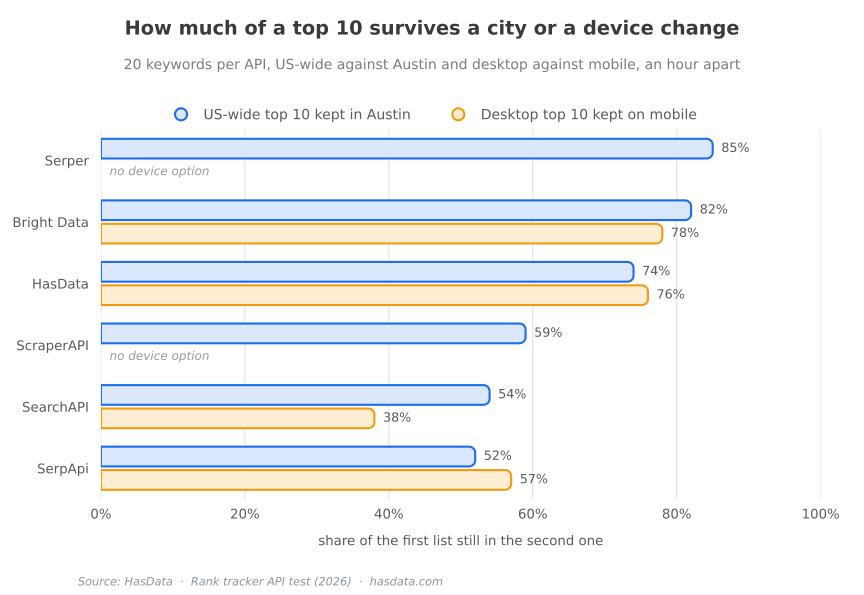
Setting the city moves more than the local keywords, and the mobile pass moves the lists again. The next table compares each API’s US-wide top 10 with its own Austin top 10 for the same keyword, about an hour apart, and its desktop top 10 with its own mobile one.
| API | US-wide top 10 kept in Austin | Desktop top 10 kept on mobile |
|---|---|---|
| HasData | 74% | 76% |
| Bright Data | 82% | 78% |
| SerpApi | 52% | 57% |
| SearchAPI | 54% | 38% |
| Serper | 85% | no option |
| ScraperAPI | 59% | no option |
Serper’s two runs were both US-wide pages, since the city didn’t take, so its row is what an hour of drift looks like with no location change at all. Against that, SerpApi and SearchAPI replaced about half of their top 10 once Austin was set, HasData a quarter and Bright Data under a fifth. ScraperAPI’s Austin run went several hours after its US-wide one, so part of its gap is drift. On mobile the first page also held fewer organic results, a median of eight to eight and a half against nine on desktop, so a site at the bottom of the desktop page is often on page two of the mobile one.
Google itself answers some searches with a second version of the page. I sent 47 non-local keywords on three days to the APIs and to both Chrome windows, and counted a response as a second version of the page when a site in the API’s top 3 was missing from the top 10 of both browsers. The second page is on topic, its sites repeat from day to day, and it moves between providers, so a keyword that came back as the second version from one API in the morning matched Chrome an hour later. The browsers get it too. For “rank tracker api” most of the APIs put keyword.com in their top three while neither Chrome window had it in its top 10, so that time the browsers held the other version. A list that swaps most of its sites overnight and swaps them back the next day is this second version, and the suspect flag in the Python tracker near the end catches it.
HasData

HasData is a web scraping service for data pipelines and AI, one API call from any URL to JSON or Markdown. A rank tracker on it is one GET per keyword to the Google Rank Checker API, which returns the organic list of one page with positions and nothing the job doesn’t need. When the tracker should also record the map pack or an AI Overview above the organic list, the Google SERP API returns the same page with every block on it.
The keyword goes in q, the city in location as a Google canonical name, and the key in the x-api-key header. A second pass with deviceType=mobile gets the mobile page.
curl -G "https://api.hasdata.com/scrape/google-light/serp" \
  --data-urlencode "q=dentist" \
  --data-urlencode "location=Austin,Texas,United States" \
  --data-urlencode "gl=us" \
  --data-urlencode "hl=en" \
  -H "x-api-key: $HASDATA_API_KEY"
Trimmed to the first two organic results, the Austin response looked like this.
{
  "requestMetadata": {
    "id": "e4e2235b-9dab-4084-82d3-c2b40f4e5a6c",
    "status": "ok",
    "html": "https://files.hasdata.com/.../e4e2235b-9dab-4084-82d3-c2b40f4e5a6c.html",
    "json": "https://files.hasdata.com/.../e4e2235b-9dab-4084-82d3-c2b40f4e5a6c.json"
  },
  "searchInformation": {
    "queryDisplayed": "dentist",
    "appliedLocation": { "location": "Austin, Texas", "basis": "From your IP address" }
  },
  "organicResults": [
    {
      "position": 1,
      "title": "Best Dentists Near Me in Austin, Texas | Delta Dental",
      "link": "https://www.deltadental.com/member/find-a-dentist/texas/austin-dentists/",
      "displayedLink": "www.deltadental.com › Member › Find a dentist › Texas"
    },
    {
      "position": 2,
      "title": "Austin Dentist | North Austin Dentistry, Open Saturdays",
      "link": "https://northaustindentist.com/",
      "displayedLink": "northaustindentist.com"
    }
  ],
  "pagination": {
    "next": "https://www.google.com/search?q=dentist&hl=en&gl=us&start=10"
  }
}
The appliedLocation block says which city Google used and where it got it from, so a tracker can check that block before it stores a position. Your domain is a filter on link across organicResults, and position is the number that goes next to yesterday’s. The requestMetadata block keeps the page itself, as HTML and as parsed JSON, under a stable URL, so a drop that shows up in the morning report can be checked against the page that produced it, and a run that died halfway through writing to the database can pick up the results it already paid for. Google no longer honors num=100, so a top-100 check is ten calls per keyword with start stepping by ten, and position restarts at 1 on every page, so a top-100 script adds the offset.
In Austin the median response was 2.6 seconds and 18 of the 20 searches came back in under five. The mobile pass ran at a median of 2.4 seconds, with 15 of 20 searches under three and none past six.
The Startup plan runs five requests at once, so 1,000 keywords take about seven minutes at the desktop median, and the mobile pass brings the two to about a quarter hour. The API doesn’t keep history. Yesterday’s position exists only if your script saved it, in a database or in a spreadsheet, and the request above is the whole input side of that job. Every account gets 1,000 free credits a month, and a request that fails costs nothing.
SerpApi

The SerpApi call for the same Austin search puts everything in the query string, the key included, and engine=google picks the search engine, with engine=bing for a tracker that also watches Bing.
curl -G "https://serpapi.com/search.json" \
  --data-urlencode "engine=google" \
  --data-urlencode "q=pizza near me" \
  --data-urlencode "location=Austin,Texas,United States" \
  --data-urlencode "gl=us" \
  --data-urlencode "hl=en" \
  --data-urlencode "device=desktop" \
  --data-urlencode "api_key=$SERPAPI_KEY"
The response opens with the request echoed back under search_parameters, and location_used there is the field to compare with the city you sent. Under search_information SerpApi also reports what Google did with the query. For “pizza near me” Google suggested “pizza near me in”, and the organic_results_state string says the page kept the exact spelling.
{
  "search_parameters": {
    "engine": "google",
    "q": "pizza near me",
    "location_requested": "Austin,Texas,United States",
    "location_used": "Austin,Texas,United States",
    "device": "desktop"
  },
  "search_information": {
    "organic_results_state": "Showing results for exact spelling despite spelling suggestion",
    "spelling_fix": "pizza near me in"
  },
  "organic_results": [
    {
      "position": 1,
      "title": "Pizza in Austin, TX | Papa Johns Brodie Ln",
      "link": "https://locations.papajohns.com/united-states/tx/78745/austin/8106-brodie-ln/pizza-near-me",
      "displayed_link": "https://locations.papajohns.com › ... › 8106 BRODIE LN"
    },
    {
      "position": 2,
      "title": "TOP 10 BEST Pizza in Austin, TX - Updated 2026",
      "link": "https://www.yelp.com/search?find_desc=Pizza&find_loc=Austin%2C+TX",
      "displayed_link": "https://www.yelp.com › Restaurants"
    }
  ]
}
Match your domain against link and store position. The other blocks on the page come under their own keys, so a tracker that also records the map pack on the Austin searches or the AI Overview on “home depot hours” reads them from the same response. Every search gets an id, and search_metadata holds a json_endpoint and a raw_html_file where the parsed result and the HTML it came from can be fetched again later.
In the US-wide pass, 11 of the 20 answers came back in under two seconds and three ran past ten. A tracker on SerpApi sets a long timeout and retries the calls that hit it, since the slow ones did come back with results.
The free plan is 250 searches a month, and paid plans start at $25, which the comparison with HasData lines up plan by plan. Every plan also caps searches per hour, from 200 on Starter to 6,000 on Big Data, so a daily run of 1,000 keywords on Big Data clears the cap in a single burst and a bigger run spreads over the day.
Bright Data

Bright Data’s SERP API takes a Google URL instead of a keyword. The request is a POST to the general request endpoint with the name of the SERP zone you created in the dashboard, the full search URL, and brd_json=1 appended to that URL so the page comes back parsed. The city goes into the URL as uule, and the same Austin canonical that HasData and SerpApi take works there as plain text.
curl -X POST "https://api.brightdata.com/request" \
  -H "Authorization: Bearer $BRIGHTDATA_KEY" \
  -H "Content-Type: application/json" \
  -d '{
    "zone": "serp_api",
    "url": "https://www.google.com/search?q=dentist&gl=us&hl=en&uule=Austin%2CTexas%2CUnited+States&brd_json=1",
    "format": "raw"
  }'
The parsed page opens with a general block that echoes the city Google used, and each organic result carries two positions.
{
  "general": {
    "search_engine": "google",
    "query": "dentist",
    "location": "Austin, Texas",
    "gl": "US",
    "mobile": false
  },
  "organic": [
    {
      "rank": 1,
      "global_rank": 4,
      "title": "Dentist in Austin, TX | High Quality Dental Experience - Dr. Jaros",
      "link": "https://www.austindentalworks.com/",
      "display_link": "https://www.austindentalworks.com"
    }
  ]
}
The rank field counts organic results only and matches what the other APIs call position. The global_rank field counts every block on the page, so the dentist above was first among the organic results and fourth on the page, below the map pack. Store rank to compare with any other tracker and global_rank when the report should say how far down the page the listing starts. Mobile is brd_mobile=1 in the same URL, and the response then says "mobile": true.
The responses were the slowest of the APIs that applied the city. In Austin more than half the searches ran past ten seconds, and the mobile pass was quicker, with a median of 6.6 seconds. One Austin call, “pizza near me”, returned status 200 with an empty body after about seven seconds, so a tracker on it has to check for a body before it parses, since the status code alone would have passed.
Bright Data bills per successful request with no cap on concurrency. The free tier is 5,000 requests a month, pay as you go is $1.50 per 1,000 requests, and the Scale plan at $499 a month includes 380,000 requests with $1.30 per 1,000 above that. There’s no annual billing, and the difference against HasData is mostly in how the volume is bought.
SearchAPI
The SearchAPI call looks like SerpApi’s, with the key in the query string and engine=google selecting the engine.
curl -G "https://www.searchapi.io/api/v1/search" \
  --data-urlencode "engine=google" \
  --data-urlencode "q=dentist" \
  --data-urlencode "location=Austin,Texas,United States" \
  --data-urlencode "gl=us" \
  --data-urlencode "hl=en" \
  --data-urlencode "device=desktop" \
  --data-urlencode "api_key=$SEARCHAPI_KEY"
The location_used field under search_parameters echoes what you sent, and detected_location under search_information is the city Google printed at the bottom of the page.
{
  "search_parameters": {
    "engine": "google",
    "q": "dentist",
    "location_used": "Austin,Texas,United States",
    "device": "desktop"
  },
  "search_information": {
    "query_displayed": "dentist",
    "detected_location": "Austin, TX"
  },
  "organic_results": [
    {
      "position": 1,
      "title": "Best Dentists Near Me in Austin, Texas",
      "link": "https://www.deltadental.com/member/find-a-dentist/",
      "domain": "www.deltadental.com"
    },
    {
      "position": 2,
      "title": "Austin Dentist | North Austin Dentistry, Open",
      "link": "https://northaustindentist.com/",
      "domain": "northaustindentist.com"
    }
  ]
}
Both fields said Austin for “home depot hours” too, and the organic results on that page were Home Depot stores in San Antonio, Corpus Christi and Memphis. The echo confirms what was requested, and the titles confirm what was served, so a local tracker reads both. The domain field saves parsing the URL when you match your own site, and position is the number to store.
The Austin pass ran at a median of about four seconds, and the mobile pass was as quick as desktop. None of the searches in any pass ran past ten seconds.
New accounts get 100 free requests. Plans start at 10,000 searches a month, the Production plan from the table has 35,000, and only responses with status 200 are billed. Each hour a plan can spend 20% of its monthly credits, which on Production is 7,000 searches, so a daily run of 1,000 keywords fits in one hour with room for retries. There’s no annual option.
Scrapingdog
Scrapingdog’s Google endpoint takes the keyword as query and the country and language as two-letter codes. The page parameter counts from zero, and advance_search=false keeps the response to the organic list and a few blocks.
curl -G "https://api.scrapingdog.com/google" \
  --data-urlencode "api_key=$SCRAPINGDOG_KEY" \
  --data-urlencode "query=dentist" \
  --data-urlencode "country=us" \
  --data-urlencode "language=en" \
  --data-urlencode "page=0"
Each result carries rank and page_rank, and on page zero the two match.
{
  "search_information": {
    "query_displayed": "dentist",
    "organic_results_state": "Results for exact spelling"
  },
  "organic_results": [
    {
      "rank": 1,
      "page_rank": 1,
      "title": "Find a dentist - Delta Dental",
      "link": "https://www.deltadental.com/member/find-a-dentist/",
      "displayed_link": "https://www.deltadental.com › member › find-a-dentist"
    },
    {
      "rank": 2,
      "page_rank": 2,
      "title": "Find A Dentist - Smile California",
      "link": "https://smilecalifornia.org/find-a-dentist/",
      "displayed_link": "https://smilecalifornia.org › find-a-dentist"
    }
  ],
  "total_time_taken": 9.37
}
The rank field is the number to store, since page_rank starts again on every page, and link is the field to match your domain on. The total_time_taken field is Scrapingdog’s own clock for the call, and it was close to what my script measured. Half the US-wide searches came back in under five seconds, and none ran past ten.
A Google search costs five credits, so the Lite plan covers 40,000 searches a month with five concurrent requests, and the annual price brings it to $33 a month. The free tier covers 20 searches. Every plan includes every Scrapingdog API, and a failed request isn’t charged.
Serper
Serper takes a POST with a JSON body and the key in the X-API-KEY header. The request is the shortest one in this list.
curl -X POST "https://google.serper.dev/search" \
  -H "X-API-KEY: $SERPER_KEY" \
  -H "Content-Type: application/json" \
  -d '{"q": "dentist", "gl": "us", "hl": "en", "location": "Austin,Texas,United States"}'
The response echoes the request under searchParameters and ends with a credits field that says what the call cost.
{
  "searchParameters": {
    "q": "dentist",
    "gl": "us",
    "hl": "en",
    "location": "Austin,Texas,United States",
    "type": "search",
    "engine": "google"
  },
  "organic": [
    {
      "position": 1,
      "title": "My Frederick Dentist: Dentist Frederick, MD",
      "link": "https://www.myfrederickdentist.com/"
    },
    {
      "position": 2,
      "title": "Dental Clinic",
      "link": "https://www.frederickhealth.org/services/dentistry"
    }
  ],
  "credits": 1
}
The echo says Austin while the results came from other states. “Pizza near me” came back with pizza places in Milford Mill, Maryland, and “home depot hours” with a store in Memphis, Tennessee, so there’s nothing in the response that tells you the city was dropped. A tracker on Serper checks national positions, and there’s no device parameter, so the positions are desktop. The Austin pass was as fast as the US-wide one, with every search under three seconds.
Serper sells credit packs instead of subscriptions. The smallest pack is $50 for 50,000 searches, which is $1 per 1,000, and a pack stays valid for six months, so the figure in the table is the share of a pack that a daily run of 1,000 keywords uses up in a month. The larger packs cost less per query, $0.75 per 1,000 at 500,000 and $0.50 at 2.5 million, and the cost table further down buys six months of a run in the cheapest single pack size and divides by six. The Starter rate limit is 50 queries a second, so that daily run finishes in under a minute. New accounts get 2,500 free queries.
ScraperAPI
ScraperAPI’s structured Google endpoint takes the city as a base64 uule value rather than a location name, and output_format=json picks JSON over CSV.
curl -G "https://api.scraperapi.com/structured/google/search" \
  --data-urlencode "api_key=$SCRAPERAPI_KEY" \
  --data-urlencode "query=dentist" \
  --data-urlencode "country_code=us" \
  --data-urlencode "tld=com" \
  --data-urlencode "hl=en" \
  --data-urlencode "gl=us" \
  --data-urlencode "output_format=json" \
  --data-urlencode "uule=w+CAIQICIaQXVzdGluLFRleGFzLFVuaXRlZCBTdGF0ZXM="
That uule encodes Austin, Texas, and the organic results came back for Beardstown, Illinois, in one run and Houston in a rerun hours later, with no Austin result for any of the three local keywords in either. Almost every link in the response is a google.com redirect rather than the destination URL, so your domain is matched against displayed_link, which holds the plain host. There’s no device parameter. Five of the 20 US-wide searches ran past ten seconds.
A Google search costs 25 credits on ScraperAPI, so the Startup plan’s million credits cover a daily run of 1,000 keywords with a quarter of the credits to spare, at 50 concurrent threads and with geotargeting limited to the US and the EU. The Hobby plan is $49 for 100,000 credits, which is 4,000 searches, and yearly billing takes 10% off every plan.
DataForSEO

DataForSEO’s Google Organic SERP API is priced per results page, with the location, language and device making no difference to the price. The Standard queue takes a POST with the tasks and a GET for the results about five minutes later, at $0.60 per 1,000 pages. The Priority queue returns within a minute at $1.20 per 1,000, and Live mode answers a single POST in up to six seconds at $2.00 per 1,000. A daily run of 1,000 keywords is $18 a month in the Standard queue and $60 in Live mode.
One page holds 10 organic results, and the depth parameter adds one base price for every further 10, so a tracker that watches the top 30 pays three times the page price and one that watches the top 100 pays ten. For a nightly batch the Standard queue fits, since the five-minute wait doesn’t matter when nobody reads the positions until the morning.
Zenserp
Zenserp sells searches in monthly plans and bills only the ones that succeed. The free tier is 50 searches a month, the Small plan is $49.99 for 25,000 searches, and the Medium plan at $149.99 for 100,000 searches is the first one that covers a daily run of 1,000 keywords, and yearly billing takes 20% off.
A batch endpoint takes a list of searches in one call, which suits a tracker that wakes up once a night and sends every keyword at once.
Rank tracking platforms with an API
Each platform below prices by tracked keyword, and the API reads what the platform already stored, so the tier that includes the API is the number to look for in each section.
SE Ranking

SE Ranking tracks Google positions down to the top 100 and updates them daily on every plan. The Core plan is $129 a month for 10 projects and 2,000 tracked keywords, and it comes with a monthly budget of 25,000 API credits and the MCP server. Growth is $279 for 5,000 keywords and 100,000 API credits, and extra keywords are sold in blocks from $22.40. Annual billing takes 20% off both.
The API is also sold on its own. The Standalone plan is $200 a month for the Data API, and subscribers to any plan can add 3 million credits a year for $540, billed yearly, which opens the Project API that reads the positions the platform collected.
Keyword.com

Keyword.com includes its rank tracker API on every plan, and the plans are priced by keyword count. Search Visibility starts at $4 a month for 50 keywords, or $3 on annual billing, with the choice of weekly or daily updates and a depth of the top 50 or the top 100. The API authenticates with a bearer token, and one GET on a keyword group returns each keyword with its current position as grank, its best position as best, the search volume as ms and the CPC. SERP history is stored without limit, and there are no separate API credits to buy.
An API-only price list exists too. At 5,000 keywords tracked daily the API plan is $38 a month for the top 50 and $52 for the top 100, with the MCP server, city-level targeting and AI Overview detection included.
Semrush

Position Tracking is in every Semrush plan. The SEO plan is $139 a month for 500 keywords updated daily, and Pro+ is $299 for 1,500. The Standard API, which includes the Projects API that reads Position Tracking, is an add-on to the Business tier at $499.95 a month, and the API units are bought on top in packages that start at 2 million units and expire with each billing month. A live Position Tracking line costs 10 units, so a nightly export of a few thousand positions is cheap once the tier is paid for.
AccuRanker

AccuRanker is priced by keyword count too, and the Professional plan starts at $249 a month for 2,000 keywords, or $224 on yearly billing. The Expert plan at $849 a month starts at 10,000 keywords and adds an unlimited read API, the first tier where a script reads the positions. Above 25,000 keywords the Enterprise plan adds the write API and keeps the results page behind each position.
Ahrefs
Rank Tracker is part of every Ahrefs plan, and the SERP history comes with it. Lite is $129 a month for 750 tracked keywords, Standard is $249 for 2,000 and Advanced is $449 for 5,000, and all three list API and MCP access. The tracked positions are the ones Ahrefs collected on its own schedule, so the API reads the platform’s history and doesn’t run a check on demand.
Authority Labs, Nightwatch and SheerSEO
Authority Labs calls it global tracking, meaning any country or language that Google, Bing and Yahoo support, with local and mobile positions updated daily and API access on every plan, from $65 a month for 250 keywords to $585 for 5,000. Nightwatch prices in euros even from a US exit, €99 a month for 500 keywords on Starter and €199 for 2,500 on Professional, with two months free on yearly billing, a Google Analytics integration and an SEO MCP server. SheerSEO sells a Rank API and a SERPs API with results down to the zip code and on mobile, paid per use from $49 at $0.95 per 1,000 credits or on monthly plans from $200 at $0.80 per 1,000, with 300 free credits to start.
What 1,000 keywords a day costs
The comparison table prices one volume, and that volume favors the APIs with a small entry plan. Below it the entry plans don’t get cheaper, apart from Serper and Bright Data, which bill by usage. Above it the plans step up in different sizes and the order changes.
| API | 3,000 keywords a day | 8,500 keywords a day |
|---|---|---|
| Scrapingdog | $90 | $200 |
| Serper | $92 | $208 |
| HasData | $119 | $249 |
| Bright Data | $135 | $383 |
| SearchAPI | $250 | $900 |
| ScraperAPI | $299 | above its listed plans |
| SerpApi | $725 | $2,750 |
Serper stays within a few dollars of the cheapest line at every volume, for a tracker that doesn’t need a city. Among the APIs that applied Austin, HasData’s plan drops below Bright Data’s from about 2,600 keywords a day and stays there, because its credit volumes grow faster than its prices. Paid for a year, HasData’s Startup plan comes to $590, while SerpApi and SearchAPI bill monthly only.
A platform’s per-keyword price replaces the API line and the script and database that go with it. At 1,000 keywords SE Ranking’s Core plan covers the count, and Keyword.com and Authority Labs sell a tier at that size. Ahrefs Lite stops short of it, and the AccuRanker tier with the API starts ten times higher, so a 1,000-keyword account there pays for capacity it doesn’t use.
Build a rank tracker in Python
The API lines above assume a script that sends the checks and keeps the history, so here’s that script. It checks a list of keywords for one domain in one city, stores every result in SQLite and marks a list as suspect when it shares fewer than half of its sites with the previous run. It needs Python 3.9 or later with requests installed and the key in HASDATA_API_KEY.
import os, sqlite3, datetime, requests
from urllib.parse import urlsplit

API = "https://api.hasdata.com/scrape/google/serp"
KEY = os.environ["HASDATA_API_KEY"]
DOMAIN = "yelp.com"
LOCATION = "Austin,Texas,United States"
KEYWORDS = ["dentist", "pizza near me"]

db = sqlite3.connect("ranks.db")
db.execute("CREATE TABLE IF NOT EXISTS ranks (checked TEXT, keyword TEXT, location TEXT,"
           " position INTEGER, parsed INTEGER, hosts TEXT, status TEXT)")

def host(url):
    return urlsplit(url).netloc.lower().removeprefix("www.").removeprefix("m.")

for kw in KEYWORDS:
    r = requests.get(API, headers={"x-api-key": KEY}, timeout=60,
                     params={"q": kw, "location": LOCATION, "gl": "us", "hl": "en"})
    if not r.ok or not r.content:
        print(f"{kw!r}: HTTP {r.status_code}, {len(r.content)} bytes, skipped")
        continue
    organic = r.json().get("organicResults", [])
    hosts = {host(o["link"]) for o in organic if o.get("link")}
    position = next((o.get("position") for o in organic if host(o.get("link", "")) == DOMAIN), None)

    prev = db.execute("SELECT hosts FROM ranks WHERE keyword = ? AND location = ? AND parsed > 0"
                      " ORDER BY checked DESC LIMIT 1", (kw, LOCATION)).fetchone()
    status = "ok" if organic else "empty"
    if prev and organic:
        before = set(prev[0].split())
        if len(hosts & before) * 2 < min(len(hosts), len(before)):
            status = "suspect"  # shares under half of the last list, recheck before reporting

    checked = datetime.datetime.now(datetime.timezone.utc).isoformat(timespec="seconds")
    db.execute("INSERT INTO ranks VALUES (?, ?, ?, ?, ?, ?, ?)",
               (checked, kw, LOCATION, position, len(organic), " ".join(sorted(hosts)), status))
    db.commit()
    print(f"{kw!r}: position {position}, parsed {len(organic)}, {status}")
The first run on the two Austin keywords printed this.
'dentist': position 5, parsed 8, ok
'pizza near me': position 2, parsed 7, ok
Yelp ranked for both, and both lists came in short of ten, so parsed is stored next to the position. A short page and a lost ranking look the same without it. The host() function drops www. and m. so a mobile result and a desktop result from the same site match, a response with no organic results is stored as empty, and the next run compares against the last list that had results. The suspect rule fires when the new list shares fewer than half of its sites with that one, which is further apart than any pair of APIs got in the Austin table, so a flagged keyword is worth one manual search before it goes into a report. A second run a few minutes later printed the same two lines, and the four calls together cost 20 credits, inside the free monthly credits.
Once a week of history has built up, compare each run with the hosts that appeared most often that week, because the previous run might be the one that’s wrong. Keep the page behind each row too, since Google keeps no record of its past results and a SERP history archive starts on the day you save the whole page with each check. A local business wants the same check from a grid of points across the city, which is what a geo-grid rank tracker adds on top of this script.
SQLite exports the table with one command.
sqlite3 -header -csv ranks.db "SELECT * FROM ranks" > ranks.csvThe positions then go into a spreadsheet or a Looker Studio report next to Google Analytics sessions for the same dates, and the same API call feeds the other Python scripts for SEO, while web scraping for SEO goes past rankings into site audits.
Which rank tracker to choose
For a local business the city column of the comparison table rules out two of the seven at once. A mobile pass needs one of the five APIs with a device option. Above the table’s volume the cost table reorders the list, and Serper stays the cheapest line only for a tracker that doesn’t need a city.
Who keeps the history decides between an API and a platform. A team that reports from its own tables pays the API line for its volume and runs a script like the one above, with the CSV export as the join to Google Analytics. A team that wants the history and the dashboard kept for it pays per keyword at a platform and reads the positions back through its API at the platform’s update frequency.
The complaint that fills the recent Reddit threads on rank tracking is a drop the tracker reports and nothing else confirms. People describe a site that falls out of a tool’s top 100 while its Search Console lines stay flat, and a brand name that ranks first one day and nowhere the next. The second version of the page and a short result list produce both, and the script above catches them with the parsed count and the suspect flag. Checking a flagged keyword needs the page the position came from, so an API that keeps the HTML of every response under a fetchable URL, which HasData and SerpApi do, saves a manual search per drop, and a platform that keeps the results page behind each position does the same from its dashboard.
In a recent r/SEO thread on third-party rank tracking, a local SEO wrote that a tracker drop no longer goes into a report on its own, “before it goes in a report i check the same query against gsc average position and the gbp performance numbers like calls and direction requests, and if those are flat the tracker is probably the thing that’s wrong.”
Search Console answers the same question for your own site with no sampling at all, and several people in those threads report from it alone. It stops at your own domain, though, so the tracker’s job narrows to what Search Console can’t show, the competitor that moved into the top three on a money term and the keywords where you have no impressions yet. A few dozen money terms checked once a week fit inside the free tiers of SerpApi and Bright Data, and at that size price drops out of the choice, leaving the city and the page kept behind each position.
The AI Overview above the organic list needs a column of its own. In our AI Overview study of 1,100 queries, an AI Overview appeared on 67% of the results pages in the second pass, up from roughly 30% a year earlier, and on 40% of those answers the domain in position 1 wasn’t cited at all, so a tracker that stores only the organic position misses where the click now goes. The cited sources also rotate, with the median answer keeping 60% of its domains from one week to the next, which makes a daily record of the aiOverview block the same kind of history as the position column. Among the APIs here, HasData’s Google SERP API and SerpApi return that block in the same response as the organic list, which the SERP API comparison shows block by block, and Keyword.com’s API plan flags it per keyword.
Before committing to an API, send 20 of your own keywords twice, an hour apart, with a city on every local keyword, and compare each API with its own second run before comparing the APIs with each other. Twenty keywords twice are 40 searches, which is 200 credits on HasData and fits inside the free plan’s monthly credits.